A free sudoku solver that runs in your browser
This page is two things in one: a sudoku solver for a puzzle you already have, and a sudoku board you can play on. Type in the numbers from a newspaper, a book or a puzzle a friend sent you, press Solve, and the answer appears. Or press play and solve a freshly generated puzzle on the same board, at the difficulty you choose.
Everything happens inside your browser. The puzzles are generated on your own device, the solving happens on your own device, and nothing you type is sent to a server. There is no account, no download, no paywall and no limit on how many boards you solve.
Two ways to use the board
- Solve a puzzle you already have. Press Enter your own puzzle at the top of the board, type in the numbers, press Solve. Detailed steps are below.
- Play a generated puzzle. Press play and a grid is built on the spot at Easy, Medium or Hard. Play it yourself and use Hint when you are stuck.
Both modes use the same grid, the same number pad and the same buttons. Switching between them never reloads the page.
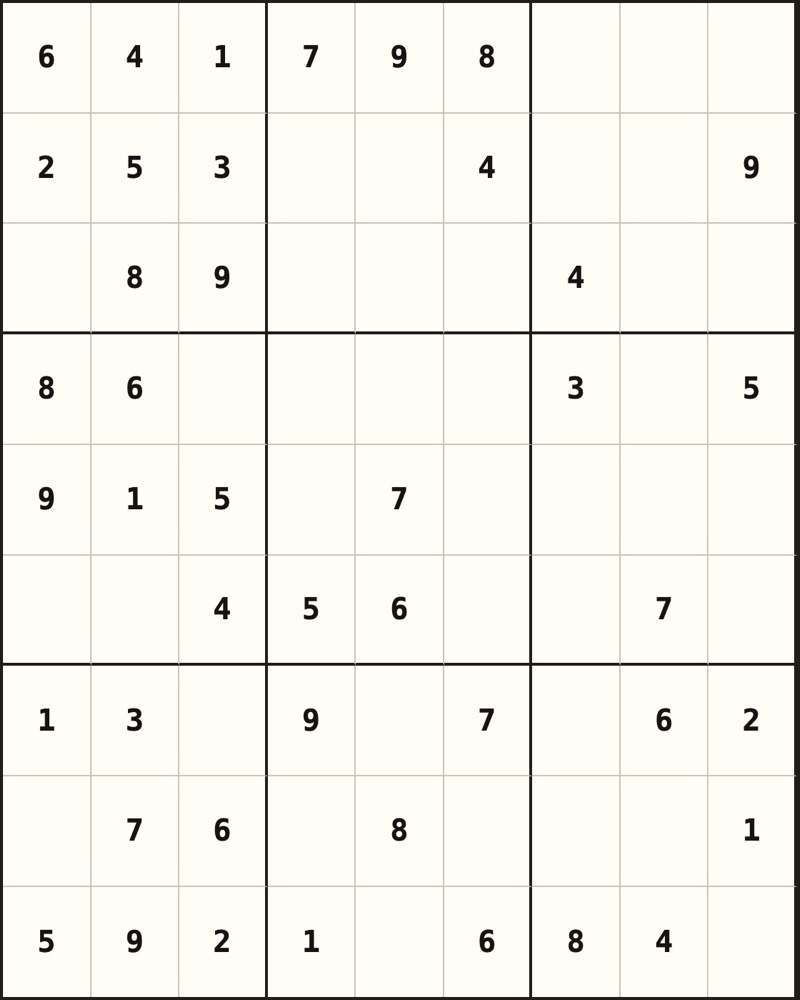
How to put numbers on the board
Tap or click a cell. It turns blue, and the row, the column and the 3×3 box it belongs to get a light tint so you can see what that cell talks to. Then:
- On a keyboard, press 1 to 9 to write a number. The arrow keys walk from cell to cell, and Backspace, Delete or 0 clears the cell you are on.
- On a phone or tablet, tap the cell and then tap a number on the pad underneath the grid. The Erase key next to the 9 clears the cell.
When you are playing a generated puzzle, the timer at the top right starts the moment you write your first number and stops when the grid is complete or when you ask for the full answer.
Solving a puzzle you already have
This is the part most people come for, so here it is without any detours.
- Press Enter your own puzzle, at the top right of the board. The grid empties and every one of the 81 cells becomes editable.
- Copy the numbers from your puzzle into the same cells on screen. Leave empty cells alone. Use the arrow keys or tap to move around; the pad and the keyboard both work. If you have the puzzle as text, use Paste puzzle to load all 81 cells at once.
- If you put the same number twice in a row, a column or a box, both cells turn red immediately. Fix them before going further — a repeated digit makes the rest of the work meaningless.
- Press Solve. The solver checks your grid and answers one of four ways:
- A repeated number — those cells are red; correct them and press Solve again.
- Fewer than 17 numbers — a sudoku needs at least 17 given digits to have a single answer, so it tells you how many you have entered so far.
- No solution — the digits do not form a valid sudoku, which almost always means one number was mistyped or placed one cell to the left.
- More than one solution — the grid you typed is missing some of the givens, so there is no single answer. Add the digits you skipped and press Solve again.
- If your grid is a proper puzzle with exactly one answer, the empty cells fill in. The numbers you typed stay black, the ones the solver added are blue, and the line under the board says so.
- Want to finish it yourself? Press Clear and the blue numbers come off, leaving your typed digits locked in place as a normal puzzle. Hint, Check and Clear all work on it from there.
Press Play a new puzzle at any time to leave your own puzzle and go back to generated grids.
Solving by hand instead? The step by step order for solving a sudoku sets out what to look at first, second and third, and what to try when a puzzle stops moving.
What the buttons do
Enter your own puzzle / Play a new puzzle
The switch at the top right. It clears the grid so you can type your own puzzle, and switches back to generated puzzles afterwards. While you are typing your own puzzle, the difficulty buttons and the Hint, Check and New puzzle buttons are hidden, because none of them apply.
Solve
On a generated puzzle, Solve fills in every empty cell, stops the clock, and shows the digits it added in blue. On a puzzle you typed in, Solve first checks the grid, then fills it in only if there is exactly one answer — see the four checks above.
Hint
Hint gives you one cell at a time. That is deliberate: one cell is usually enough to unblock the next move without spoiling the rest of the puzzle. If you have written a number that does not belong in its cell, Hint points that one out first, in red, before it fills anything.
Check
Check looks at what you have written so far. Wrong numbers are marked in red, correct ones stay blue, and the line under the board tells you how many cells are still empty. Nothing is filled in for you, so you can keep working on the same puzzle afterwards.
Clear
This removes everything that is not part of the current puzzle and leaves the original digits untouched, so you can start the same grid again. On a puzzle you typed in and solved, it takes the solver's blue digits off and leaves your own numbers as the puzzle.
New puzzle
Asks for a fresh grid at the difficulty you have selected and resets the timer to zero. Every board is generated on the spot, checking that the puzzle has exactly one answer before it is shown to you, so two puzzles are never the same.
Three difficulties
| Difficulty | Empty cells | Good for |
|---|---|---|
| Easy | 38 | Learning the board, a quick break |
| Medium | 46 | A normal newspaper-level puzzle |
| Hard | 52 | A longer sit, more scanning |
Switch difficulty at any time with the three buttons above the grid, then press New puzzle for a board at that level. The difficulty setting does not affect puzzles you type in yourself.
All three levels use the standard 9x9 grid: 81 cells, 27 units, one answer. What 9x9 means in sudoku covers the layout, the 17-clue minimum, and how the grid differs from 4x4, 6x6 and 16x16.
What this board does not do
It is worth being straight about the limits, since this is a solver page.
- No photo or screenshot upload. You can type the digits yourself or paste a text grid.
- No cross-device saves. The last board is kept in this browser on this device.
- No variants. Killer sudoku, X-sudoku and word sudoku are not supported; this grid takes the classic 9×9 puzzle with one answer.
Four sudoku techniques to practise
These four techniques give you a useful starting point. Each uses deduction rather than guessing.
1. Scan one number at a time
Take the number 5. Find every 5 already on the board, then look at each 3×3 box in turn and ask where a 5 could still go in that box. Often a row or column already has a 5, which leaves a single possible square. Do that for 1 through 9 and you will place several numbers before you have to think hard.
2. Look for a naked single
Pick an empty cell and count what is still allowed in it. Cross out anything that already appears in its row, its column or its box. When exactly one number survives, that is the answer for that cell. Beginners usually work cell by cell in the box with the most numbers filled in.
3. Look for a hidden single
A missing digit may have only one possible cell in a row, column or box, even when that cell has several candidates. Check each missing digit across the unit to spot it.
4. Box-line reduction
Sometimes a number can sit in only two or three cells of a single row inside one box. Even though you do not know which cell it is, you know the number must be in that row, so it cannot appear in that row anywhere else on the board. That quietly removes candidates from other cells and often creates a naked single somewhere else. There is a longer walkthrough of these techniques on the four techniques for solving sudoku page.
Questions players ask
Is it really free?
Yes. Every puzzle, every hint and every answer, without a payment, a trial or an advert to sit through.
Can I type in a puzzle from a newspaper or a book?
Yes. Press Enter your own puzzle, type the digits into the matching cells, and press Solve. The solver tells you if a number is repeated, if the grid has no solution, or if it has more than one — and gives the answer when the puzzle is a proper one.
What if my puzzle has more than one answer?
That happens when some of the given digits were left out while typing. The solver will not pick one for you; it asks you to add the missing digits and press Solve again.
Do I need to make an account?
No. There is nothing to sign up to and nothing to log into. Open the page and use the board.
Can I play on my phone?
Yes. The board resizes to fit the screen and the number pad sits under the grid, within reach of a thumb. Fullscreen from the button under the board gives you more room on a small screen.
Is there a time limit?
The clock counts up, it does not count down. Nothing ends when the timer reaches a number, and you can take as long as you like. When you are typing in your own puzzle the clock stays at zero until you are done solving.
Can I print a puzzle?
Yes. Press Print below the board to print the grid as it is now, before or after solving. You can also save it as a PDF if your browser offers that option.
Can I photograph a puzzle instead of typing it?
The board accepts typed digits or pasted text. It has no image upload or camera button.
Do the generated puzzles always have one answer?
Yes. Before a grid is shown, it is checked that exactly one solution exists, so a puzzle never has two valid answers.
What happens if I close the page?
Open the board again in the same browser to resume your last puzzle, as long as this site's data is still stored on your device. The puzzle is never saved on our servers.
Leave a message
Share your best time or a sudoku tip that helped you get unstuck. Messages are public; please don't include personal details.